
Width & Spacing
Customize Background per Section
From the Theme panel, you can adjust your site layout, which includes setting page width; and default section, column, and inner column spacing.
To access site layout settings:
- In the side panel, click Theme.
- Click Width & Spacing.
- Click the desired section to expand it.
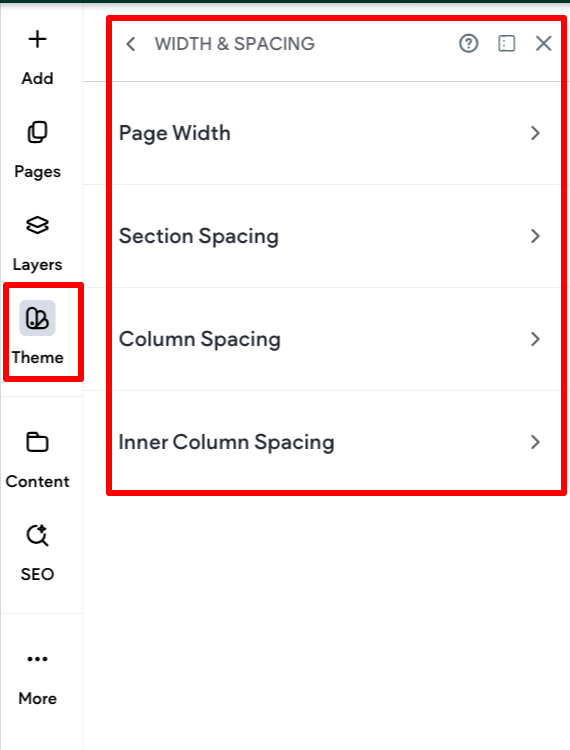
Page Width
You can set the default page width for sections not set to full width (previously called “full bleed”) on desktop. Adjusting the default page width can help ensure the best readability and design for the site for how it will be displayed. For example, some websites are displayed on a tv screen or screens larger than the average desktop computer.
To set default page width:
- In the side panel, click Theme.
- Click Width & Spacing.
- Click to expand the Page Width section.
- Select either 1200 px, 1440 px, or Custom. If you select Custom, use the slider to select pixel width or enter a value in the field. The custom value can be between 960px to 1920px, or between 50 vw to 100 vw.
Enable the Full width toggle if you want all new sections to have full width by default.
Section Spacing
You can set the default padding for new, blank sections added to your site. If desired, you can override the theme section spacing in the section’s design panel.
Important considerations:
- Sections added to the header retain the default header spacing, regardless of what is set in the theme’s section spacing.
To set section spacing:
- In the side panel, click Theme.
- Click Width & Spacing.
- Click to expand the Section Spacing section.
- Click in the respective boxes to edit the padding values. The horizontal padding values are linked. If you change one, the other will automatically update. They can be unlinked by clicking the link icon. Note that section spacing is set per breakpoint.
If necessary, click Reset padding to reset all values to zero.
If you modify an individual section's padding, it overrides the theme settings. You can reset it back to theme Section Spacing settings by opening the section's design panel and clicking Reset to theme spacing in the Section Spacing drawer.
Column Spacing
You can set the default padding for new, blank columns added to your site. If desired, you can override the theme section spacing in the column's design panel.
To set default spacing for columns:
- In the side panel, click Theme.
- Click Width & Spacing.
- Click to expand the Column Spacing section.
- Click in the respective boxes to edit the padding values. The vertical padding values are linked. If you change one, the other will automatically update. They can be unlinked by clicking the link icon.
Inner Column Spacing
You can set the default padding for new, inner columns added to your site. If desired, you can override the theme section spacing in the inner column's design panel.
To set default spacing for inner columns:
- In the side panel, click Theme.
- Click Width & Spacing.
- Click to expand the Inner Column Spacing section.
- Click in the respective boxes to edit the padding values. The vertical padding values are linked. If you change one, the other will automatically update. They can be unlinked by clicking the link icon.
Updated 3 months ago