
Setting Airbnb Cancellation Policies
You can configure the Airbnb cancellation policy for each listing directly within Uplisting. This setting applies at a per-property level and syncs only to Airbnb.
NOTE:
- The Airbnb cancellation policy field will only appear if the listing is fully connected to Airbnb.
- Listings in read-only mode will not display this option
If the setting is missing, check the listing's Airbnb connection status
How to update the Airbnb cancellation policy
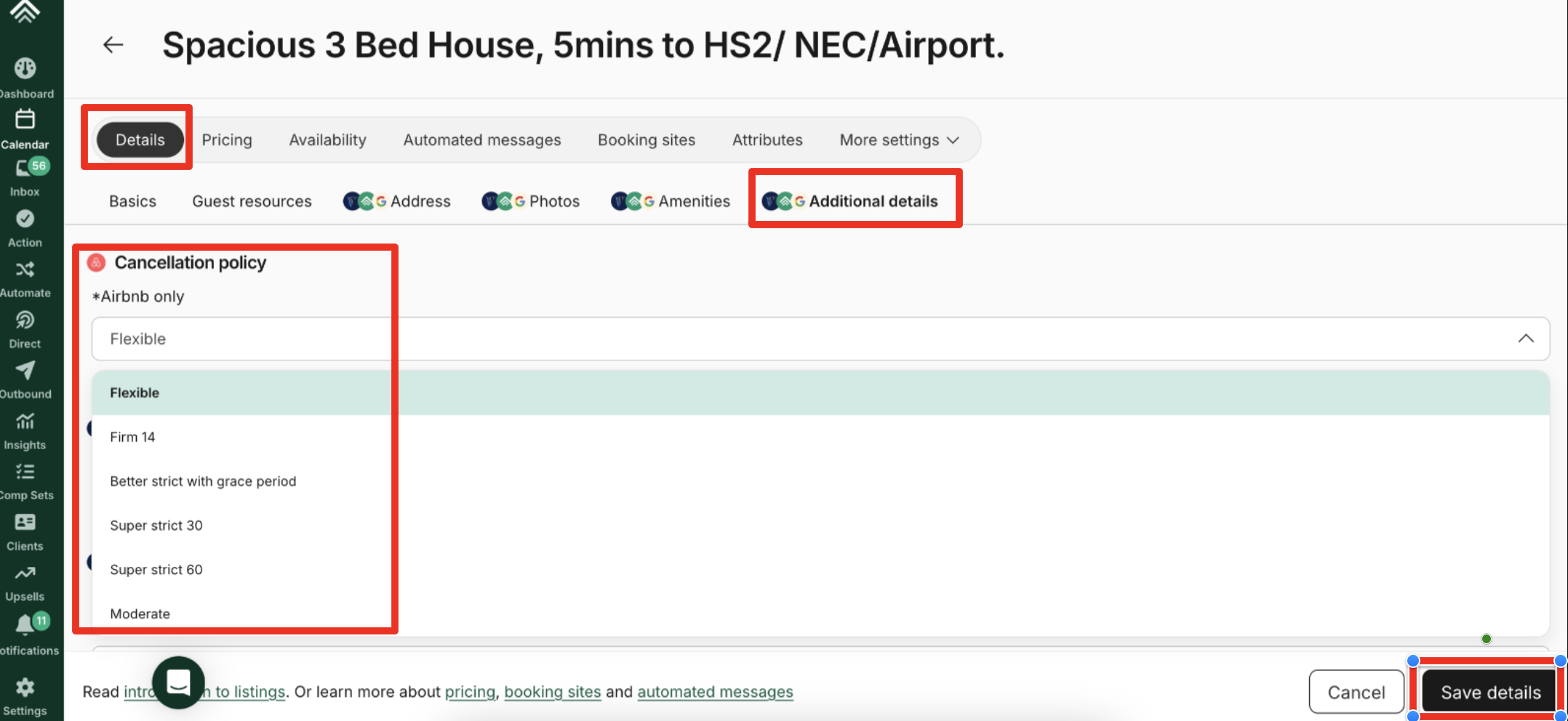
- From your Uplisting calendar, select the relevant listing
- Select the Details tab
- Click the Additional details tab
- Find the Airbnb cancellation policy option
- Select one of the available Airbnb-defined policies (e.g., Flexible, Firm 14, Better strict with grace period, Super strict 30, Super strict 60, and Moderate)
- Click Save details.
Updates typically sync to Airbnb within a few minutes
NOTE:
- Airbnb cancellation policies are defined by Airbnb and cannot be customised beyond the available options
- On Uplisting, the Airbnb policies must be set individually per listing , it's currently not possible to bulk update them
Updated 20 days ago