
Airbnb Quality Dashboard
The Airbnb Quality Dashboard helps you understand how your Airbnb listings are performing, where improvements are needed, and how you can reduce risk and improve guest satisfaction.
The Dashboard gives you one place to:
- See how your listings are doing right now - review scores (5-star %, trends), quality ratings, and risk status all in one place.
- Spot issues and opportunities quickly - find things that could lead to suspensions or cancellations, and see suggestions for improvements.
- Dig into the details - get full context at the listing and booking level.
- Export and share with your clients - download CSV files to help with reporting or client conversations.
How to access the Airbnb Quality Dashboard
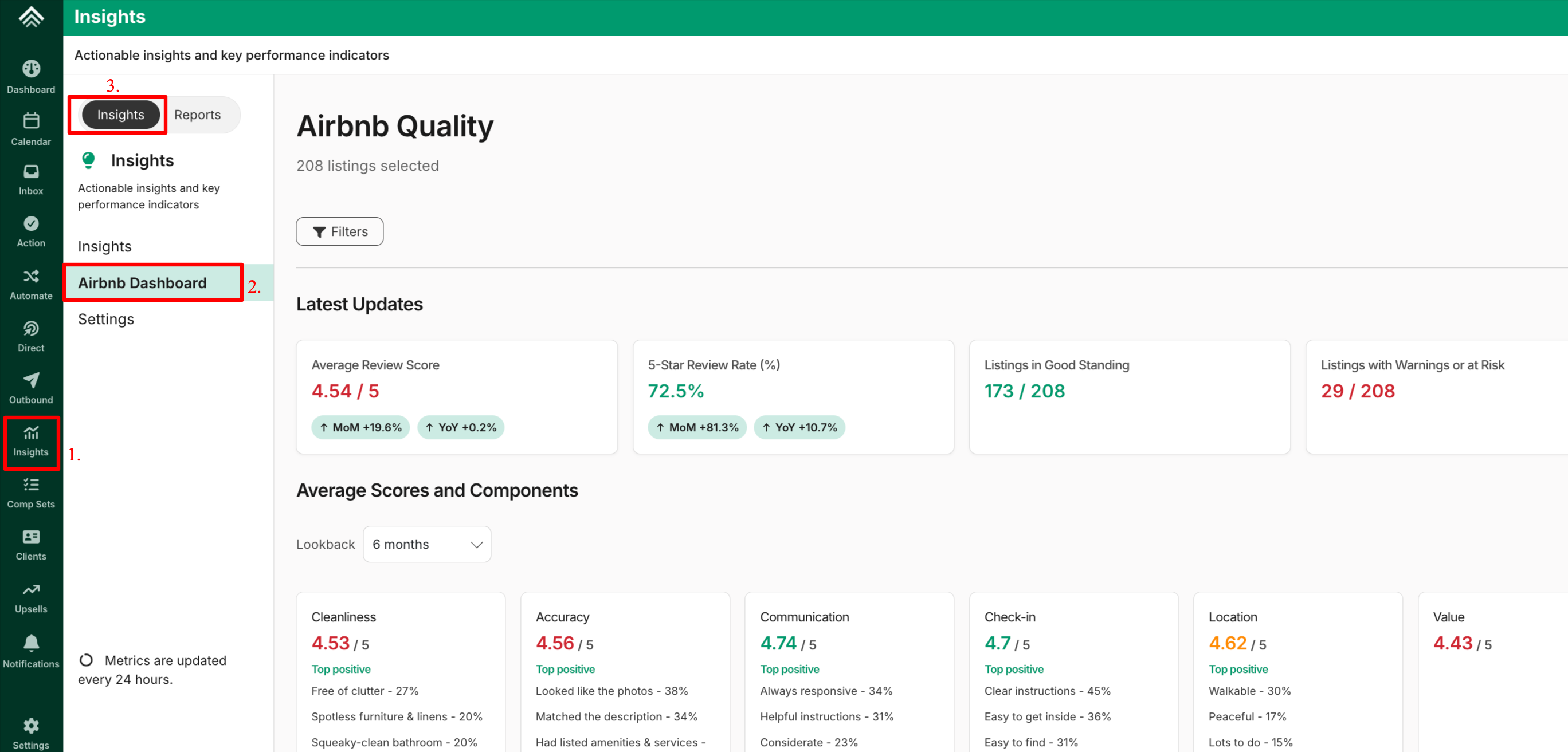
- Select the 'Insights' menu on the left panel of your Uplisting calendar.
- From the Insights page, select the Insights tab located next to the Reports tab
- Then click on the Airbnb Dashboard option
What metrics are included?
The Dashboard combines all Airbnb Quality API updates into one clear view, making it easier to track performance, spot issues, and take action quickly. The available filters include:
- Country
- City
- Client name
- Property
- Has trip issues
- Quality state
- Cancellation policy
This gives you a complete picture of your Airbnb listings’ health.
NOTE:
The Insight Metrics are updated every 24 hours
Dashboard Layout Overview
The dashboard is designed to take you from high-level performance to detailed insights:
Updated 2 months ago
What’s Next