
Widgets: Facebook Feed
Widget Categories: Social
A Facebook feed is a great way to give your visitors a glimpse into your Facebook community, invite
them to join your followers or prompt them to contact you via Facebook Messenger.
In order for your page’s feed to be displayed, the page must not be restricted. Any restriction, for
example, login required, age or location, will prevent the page from being displayed in the widget. To
learn more about Facebook page restrictions, see Facebook’s guide.
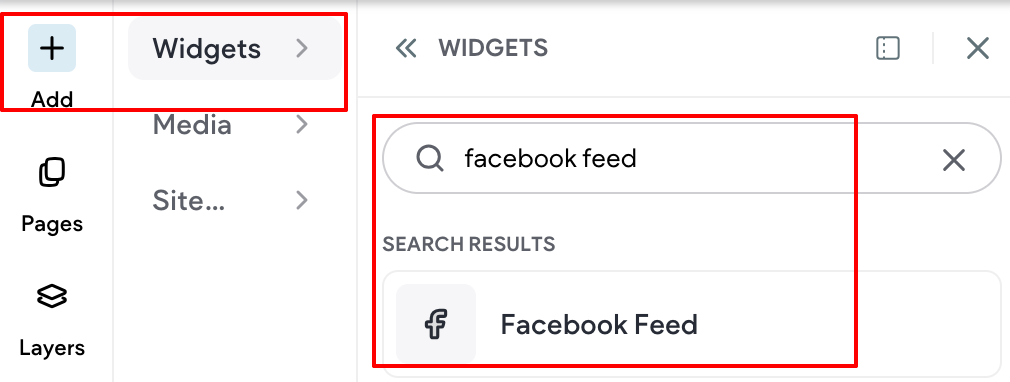
For information on adding widgets, see Add Widgets.
TIP
For more information on widgets and the widgets library, see Widgets: Library and Overview
Content Editor
To access the content editor, right click the widget and select Edit Content. Or, if you are in flex mode
or Editor 2.0, the option to access the content editor is available in the floating menu. Click the element
to open the floating menu, then click the option for the content editor.
- Type the Facebook Page URL in the field provided. You do not have to paste the entire link (for
example, https://www.facebook.com/facebook). The page ID is enough (for example, Facebook).
The URL must be for a Facebook page, not a Facebook Group. - Click to enable a Large Header, Cover photo, and Friend's faces.
- Select which tabs you want to display: Timeline, Events, Messages.
Design Editor
To access the design editor, right-click the element, and click Edit Design. Or if you are in flex mode
or Editor 2.0, select Edit Design from the floating menu to open the design panel. Click the element to
open the floating menu, then click the option to edit design.
For information about design options that are not specific to this widget (for example, layout, style, or
spacing), see Widget Design
FAQs and Troubleshooting
The Facebook Feed is not displaying when I use Safari on iPhone.
If you're not seeing a Facebook related widget on your site or editor in Safari, this is due to changes
with Facebook and Safari. Safari has added a 3rd party prevention switch that affects advertisers like
Facebook. This is not something Website Builder has control over and we are not able to fix it.
If the Facebook Feed is not displaying on another browser, this is due to Facebook changes that require
you to be logged into Facebook to view Facebook related content. To fix this, open a new tab, then log
into Facebook and refresh the page.
Facebook Feed is not displaying on mobile.
Facebook is having an issue with Feeds appearing on mobile sites. This is not a Website Builder issue.
For more information, see Facebook Community Thread.
Updated 3 months ago