
Introduction to Protect
Introduction to Protect
Background to how this powerful feature works for both you and your guests
Video introduction to Protect
How Uplisting Automated Security Deposits work
Very simply Automated Security Deposits collect a security deposit from your Booking.com, Vrbo and direct booking guests. You can enable/disable security deposits and determine the amount you wish to charge for each property.
If a guest does not provide a security deposit (either a payment method is not provided, or the payment method doesn't have sufficient funds), you are alerted via email and can handle the booking as you see fit.
Does Uplisting take full payment or pre-authorise the card?
We've upgraded the security deposit collection feature to save you as much money as possible. We are now pre-authorizing the card for all bookings.
Uplisting smart collection
- Uplisting takes a hold (pre-auth) for all bookings.
- Uplisting attempts to re-auth 24 hours before the hold expires. Visa holds are valid for approximately 5 days (4 days and 18 hours), while Mastercard, Amex, and Discover holds are valid for up to 7 days. The system re-authorizes before these windows expire to maintain the hold throughout the stay.
- If successful, repeat 24 hours before the next hold expiration.
- If unsuccessful, take full payment.
Here's how the mechanism of the security deposit charging works:
Understanding Our Security Deposit Process
We pre-authorize a booking 24 hours before check-in and then re-authorize 24 hours before a hold expires. This ensures that the security deposit is held throughout the duration of the booking. Additionally, we give you at least 48 hours to check the property before a security deposit is released.
Example:
For a booking from 11.03.2022 to 17.03.2022 (dd.mm.yy), with arrival time 16:00 and departure time 10:00:
10.03.2022 @ 16:00: The security deposit is authorized 24 hours before check-in.
This initial authorization lasts for 6 days, expiring on 16.03.2022 @ 16:00.
11.03.2022 @ 16:00: The booking checks in.
17.03.2022 @ 10:00: The booking checks out.
Since the initial authorization expires on 17.03.2022 @ 16:00, the security deposit will be re-authorized on 16.03.2022 @ 16:00 (24 hours before the initial authorization expires).
🚧 Reminder that Visa holds are valid for approximately 5 days (i.e. 4 days and 18 hours), meaning we will re-authorize after 3 days and 18 hours
Key Points:
Initial Authorization: Occurs 24 hours before check-in and lasts for up to 6 days.
Re-Authorization: Happens 24 hours before the current authorization expires, ensuring continuous coverage throughout the stay.
48-Hour Window: You have at least 48 hours after check-out to inspect the property before the security deposit is released.
How Uplisting collects payments from guests
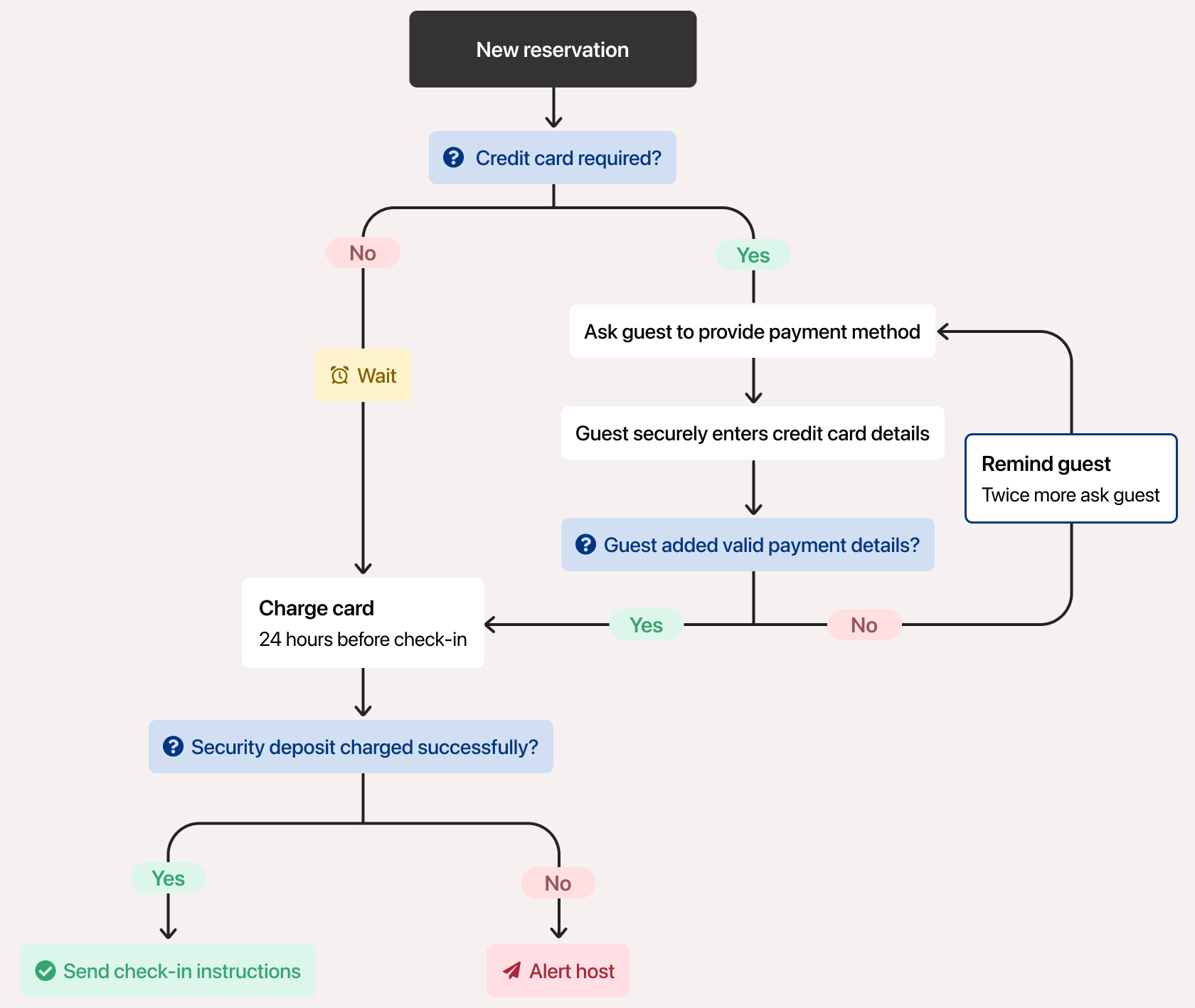
Uplisting already has credit card details for Vrbo (HomeAway) and direct bookings via your website. If you use Payments by Booking.com, or if Booking.com don't provide credit card details to Uplisting, we need to collect a credit card from your guest to process the security deposit payment.
The automated security deposit feature works in scenarios. However, you must have at least one Stripe account (you can have multiple) and connect that Stripe account to Uplisting.
This illustration below shows how the feature works, depending on whether Uplisting has access to the guest credit card.
Setting when the deposit is released
By default, your security deposits follow the process above: Uplisting keeps re-authorising the hold until it naturally expires, then releases it.
Both settings can be found under Automate > Guest identity and deposits.
Releasing deposits automatically after check-out
Rather than waiting for the pre-authorisation to expire on its own, you can have Uplisting cancel/release it a set number of days after a guest's check-out.
- Go to Automate > Guest identity and deposits.
- Under Protection for every booking, find Automatically release deposits.
- Turn the toggle on.
- Under Release after, choose how many days after check-out you'd like the pre-authorisation cancelled: 1, 2, 3, 5, or 7 days.
🚧 You can only choose from these preset options — it isn't possible to set a custom number of days. Before you move on, double-check you've picked the release period you actually want, as this is what will apply going forward.
Once set , the changes apply to future bookings only — bookings already confirmed won't be affected.
Only applies to listings and channels/booking sites that already have the deposit feature enabled.
Leave it switched off, and the default release process (described above) continues to apply.

Holding deposits for longer on long stays
Standard holds last up to 7 days, which means a deposit on a long stay needs re-authorising several times over the course of the booking.
The Extended deposit holds feature now lets you hold the deposit for up to 30 days instead, so it needs re-authorising less often, useful for stays of 30 nights or more.
- Go to Automate > Guest identity and deposits.
- Scroll to locate 'Extended deposit holds'.
- Turn the toggle on one or more Stripe account(s) that you'd like this applied to.

Note:
You'll need to turn it on separately for each Stripe account — enabling it for one doesn't enable it for the others.
Applies to future bookings and overrides the default hold length for the Stripe account(s) you enable it on.
You can turn it on or off at any time.
FAQs
Are these settings switched on by default?
No. Both Automatically release deposits and Extended deposit holds start switched off. Until you turn them on, deposits follow the default release process described earlier in this article.
What happens if I don't set a deposit release period?
The default process applies — Uplisting follows the standard deposit worflow until it expires naturally, then releases it.
Can I set a custom number of days, like 4 or 6?
No, release after only offers preset options: 1, 2, 3, 5, or 7 days.
Will this affect bookings that are already confirmed?
No. Both settings only apply to bookings made after you switch them on.
Does automatic deposit release apply to every listing and channel?
Only to listings and channels/booking sites that already have the deposit feature enabled. If a listing or channel doesn't have deposits enabled, this setting won't have any effect there.
Who should use 'Extended deposit holds' feature?
Hosts with long stays (30+ nights), where a standard hold would otherwise need re-authorising several times during the booking.
Does Extended deposit holds work with any Stripe account?
Only accounts that support extended authorisation, and you'll need to switch it on for each one individually on the Guest identity and deposits page.
Can I switch either setting off again later?
Yes, at any time. Changes apply to future bookings going forward.
Where do I manage these settings?
Automate > Guest identity and deposits, in your Uplisting account.
Updated on: 14/09/2026
Thank you!