
Manage Elements
Manage Elements
You can show or hide elements.
Show or Hide Elements
You can see all of the hidden widgets on a page by clicking the Unhide Elements icon. In the Edhe
Unhide Elements icon is in the Layers panel next to the hidden element.
The Unhide Elements icon only displays if you have hidden elements in your site.
📘 NOTE
When using the Unhide Elements feature, it only unhides or shows them on the device/screensize you are currently editing.
Hide Elements
You can hide an element per device(s) from the context menu or floating bar.
Hide Element from Floating Bar
To hide an element from the floating bar:
- Click _the element to open the floating bar.
- Click the three horizontal dot icon.
- Select Hide from, then select one or multiple devices. Note that if you hide the element on all\
devices or the device you are currently working from, the menu will disappear because the element
is hidden.
Hide Element from Context Menu
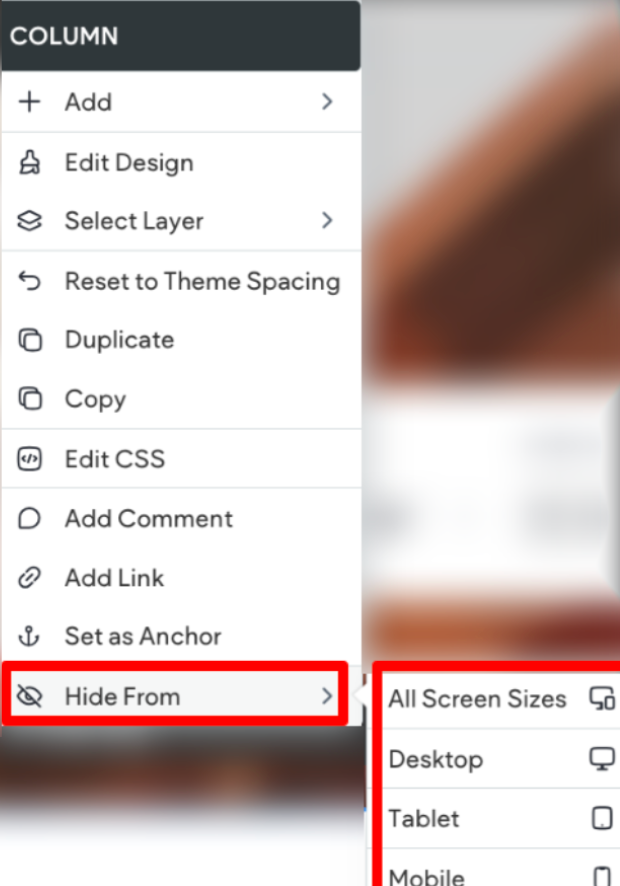
To hide an element from the context menu:
- Right-click the element to open the context menu.
- Click Hide from, then select one or multiple devices. Note that if you hide the element on all\
devices or the device you are currently working from, the menu will disappear because the element
is hidden.
Unhide Elements
If an element is hidden on all devices or the breakpoint you are currently on, it can only be unhidden
from the Layers panel. If an element is only hidden on some devices, it can be unhidden from the
floating bar or context menu.
Unhide from Layers Panel
To unhide an element from the Layers panel, click the crossed out eye icon next to the desired
element. Note that unhiding an element from the Layers panel only unhides the element for the current
breakpoint.
Unhide Element from Floating Bar
To unhide an element from the floating bar:
- Click the element to open the floating bar.
- Click the three dot icon and select Hide from.
- The devices that the element is currently hidden on, have a strike through the\
device icon. Click the desired device to unhide the element.
Unhide Element from Context Menu
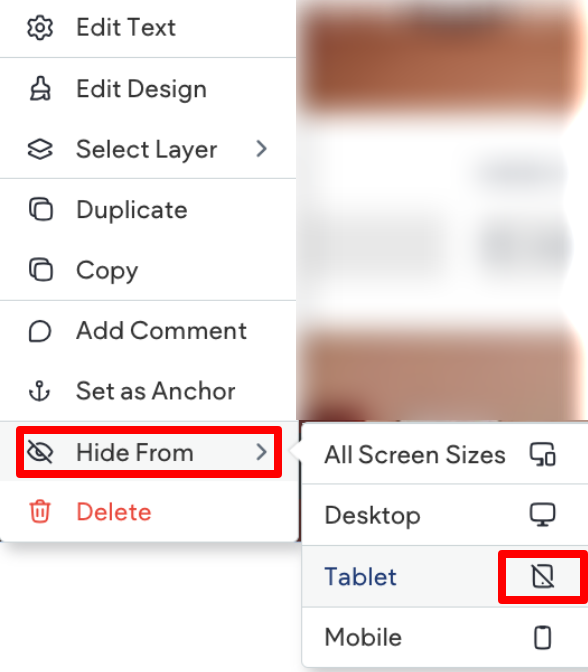
To unhide an element from the context menu:
- Right click the element to open the context menu.
- Click Hide from.
- The devices that the element is currently hidden on are in orange and do not have a strike through\
the device icon. Click the desired device to unhide the element.
Updated on: 12/05/2026
Thank you!