
Lead time rate rules (last minute discounts)
Lead time rate rules (last-minute discounts)
Lead time rate rules offer a simple but powerful rate automation feature for property managers. Set last-minute rate discounts (or increases) at 7, 14 and 28 days.
Lead time rate rules replace prices set by AirDNA Adapt or another pricing tool on the dates they change.
🚧
Lead time rate rules change a listing's nightly rate automatically when a date is still unbooked 7, 14 or 28 days before arrival.
Set a lower rate to fill last-minute gaps, or a higher one. Rules use whole-number rates, not percentages, so you set the exact price you want on each threshold.
To change the minimum stay rather than the rate as a date approaches, use Minimum stay by lead time instead.
How to set lead time rate rules
- Open the listing and go to More settings > Lead time rate rules.
- Toggle on the rule you want (7, 14 or 28 days) and enter the rate.
- Click Save rate rule.


How it works
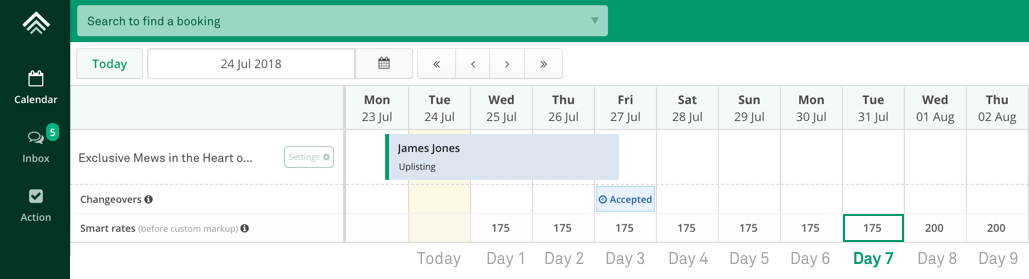
Example: base rate £200, reduced to £175 if unbooked 28 days out, £150 at 14 days and £125 at 7 days.
When you save a rule, the rate changes immediately on the threshold date only (for example, day 7). Dates inside the threshold (days 1 to 6) are not changed at set-up, so rates you have set manually are not overwritten.
From then on, the rule runs every night at 12am GMT and updates the rate as each date reaches the threshold.
Troubleshooting
- Rates inside the threshold didn't change after I saved the rule: expected. Only the threshold date changes on day one; the rest update nightly as they cross the threshold.
- I use PriceLabs, Wheelhouse or Beyond Pricing: those tools push rates to Uplisting and will overwrite rule-set rates. Set last-minute discounts in the pricing tool instead.
Related articles
Updated on: 08/11/2026
Thank you!