
Airbnb Offline Security Deposits
Airbnb Offline Security Deposits
You can collect offline security deposits when using Uplisting.
🙋
Am I allowed to take offline security deposits for Airbnb bookings?
Yes. Airbnb lets select software-connected hosts collect security deposits off Airbnb, as long as the amount is in the offline security deposit fee field. See Airbnb's off-platform policy.
Note: We no longer need to request approval for this from Airbnb as it's now done automatically on their side.
Airbnb has confirmed that hosts connected through Uplisting are covered.
Reach out to our customer support using the chat widget or support@uplisting.io if you have any issues with Offline Security deposits
Introduction to Airbnb security deposits
Airbnb offers two security deposits. The first is offered to all hosts and is probably what you are most used to. This deposit isn't actually collected by Airbnb (or you).
As explained by Airbnb'ssecurity deposit guidance page
Host-required security deposits are different from Airbnb-required security deposits in that no authorization hold will be placed. Guests will only be charged if a host requests to collect on their security deposit. Depending on what was damaged, the amount the host requests may or may not be the same as the security deposit.*
As you can see, this deposit type doesn't offer you too much protection.
The second security deposit type is only available to hotel and software connected (ie. Uplisting) hosts. Airbnb call this an offline fee. Here's a link to Airbnb guidance regarding offline fees. When you set an offline security deposit fee you are allowed to take a deposit directly from your guest via credit card, cash etc.
As explained by Airbnb's offline fee guide
These (offline) fees are collected directly from guests using a separate payment method outside of Airbnb. Fees are normally collected before a guest’s stay, at check-in, or within 48 hours of checkout.
How to enable an offline security deposit
📘 Do you want Uplisting to automatically collect payment information from guests?
If you'd like Uplisting to automatically collect payment information from your Airbnb guests then there are two steps to the process as you also need to enable our (optional) Protect feature. If you'd prefer to collect the payments manually yourself, all you need to do is step 1, below.
1. Enter an offline security deposit amount
- Go to each
Property settings > Pricing > Charges & feespage - Scroll down to ` Airbnb Fees '
- Enter a value in the
Offline security depositinput - Click on 'Save changes'
📘 If Uplisting holds the deposit (Protect), this field follows your Protect deposit amount. It is rounded up to a whole amount and you can't edit it while it follows the deposit.
If SafeGuest holds your deposit, this field follows your SafeGuest deposit amount in the same way.

What changes on my Airbnb listing when I enable this feature?
Once you enter a value above, Airbnb will display a note to your guest on the booking payment page (ie., once they have entered dates and selected 'reserve').
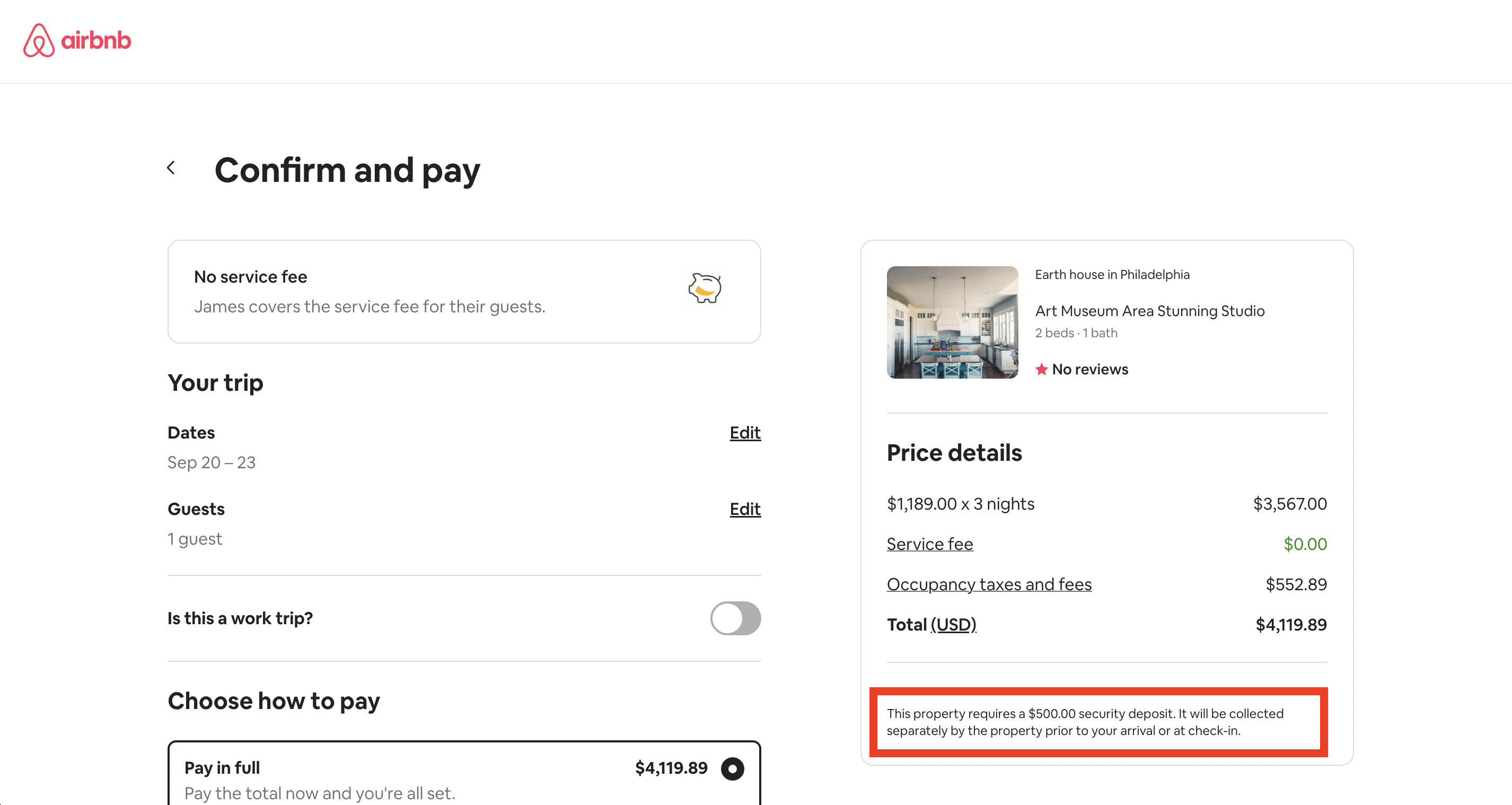
Airbnb offline deposit method
2. Enable the Uplisting Protect feature to collect guest payments automatically
❗️ Security deposits will be enabled for all existing Airbnb bookings
Once you toggle on the Protect feature for Airbnb Uplisting will create security deposits for all existing Airbnb bookings. If you haven't added a description on your listing or hadn't enabled offline security deposits at the time those bookings were created you may not be able to collect deposits from those guests. You can override the deposit requirement on each booking on Uplisting.
To remind guests about the deposit, add the
{guest_booking_link}tag to a message in Outbound.
Don't make door codes or check-in instructions wait on the deposit for Airbnb guests.
You can learn more about our Protect (automated security deposits) feature here.
- Enable the Protect feature
- Ensure Airbnb is enabled (you can enable/disable the feature per booking site
- Go to Protection › Settings (older accounts: Automate › Guest identity and deposits), here, and set your deposit. The Airbnb offline security deposit then follows this amount.

FAQ's
Is there a guide on Airbnb that I can point to if a guest asks me?
Yes. Here's a link to Airbnb guidance regarding offline fees.

What are Airbnb's rules for releasing a deposit?
Deposits must be released within 7 days if there is no damage. Keeping part of a deposit needs a written explanation and evidence. A deposit can't be used to charge a fine. See Airbnb's off-platform policy.
Updated on: 18/11/2026
Thank you!