
Channel Mark up
Channel Mark up
Quick introduction to smart rates
By default, Uplisting add's 15% to Airbnb (as Airbnb automatically set you to their host only commission setting, which you can reset), 15% to Booking.com and 8% to Vrbo (Homeaway) when syncing prices. We call these Smart Rates. You can learn more about Smart rates.
Why markup booking site rates?
Each booking site offers different commission structures. Booking.com charge a host commission (~15%) on the rate you set, whereas Airbnb offers the option to a. split the commission between the host (3%) and the guest (6–20%), or b. for the host to pay all the commission (15%). Vrbo (Homeaway) charge 15% commission to hosts and 4% to 9% to guests (but their model is always changing!).
How Uplisting booking site markup can help
Set and forget. Enter your desired markup and Uplisting will automatically add that extra % to the rates synced to each booking site. Ensure service and 'extra hassle' charges are accounted for and experiment with prices.
How to set booking site markup rules
You can override the default commission levels on the Channel Markup screen. This allows you to ensure service and 'extra hassle' charges are accounted for and experiment with prices. For example you could set +35% for Booking.com and -10% for Airbnb.
How does customer markup work?
It's simple, whatever custom markup you set will be multiplied by the Smart Rate you enter as a base rate, calendar rate or using the bulk update rate feature.
Example calculation
You set:
- 20% custom commission for Airbnb
- 10% for Booking.com
Entering a value of $100 as a Smart Rate will result in:
- $120 synced to Airbnb
- $110 synced to Booking.com
The Channel Markup screen has a helpful calculator so you can easily see the rates that will sync to each booking site.
How do I know what rates are synced?
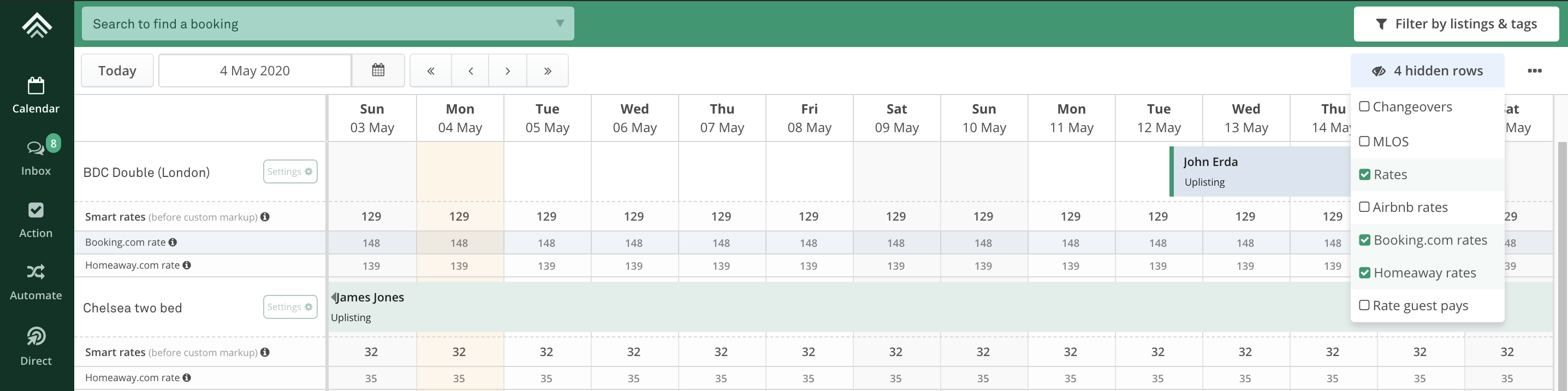
Assuming you have connected to Airbnb (at least), you will notice a 'hidden rows' button on the right-hand side of the calendar toolbar. Selecting this allows you to show and hide booking site rates (and other information), as shown below.
I don't want any markup on my rates
Just enter 0 and no commission will be added on top.
Updated on: 12/05/2026
Thank you!